Automating Hardware Engineering Workflows with NEX.md
Modern hardware projects are far more than collections of RTL files. They combine SystemVerilog, generators, build scripts, verification environments, documentation, and CI infrastructure. Successfully contributing to these projects requires understanding not only the codebase, but also the engineering practices followed by the team.
Rather than repeating those practices in every conversation, NEX.md allows you to encode them once at the repository level. From that point onward, NEX automatically adopts your team's preferred workflow whenever it operates inside that project.
In this tutorial, you'll learn how to use NEX.md to automate a hardware engineering workflow. Using OpenTitan as a real-world example, we'll show how NEX can navigate a production-scale repository, follow repository-specific conventions, and autonomously implement a real bug fix with minimal prompting.
The Challenge
Our goal is to reproduce the work that eventually became OpenTitan PR #9858.
The original issue reported that the SPI_HOST peripheral should keep its outputs disabled after reset until software explicitly enables them.
This is a realistic engineering task because it requires understanding an existing subsystem rather than generating code from scratch.
To keep the exercise fair, we will not provide NEX with the implementation or the merged pull request. Instead, we'll describe only the engineering objective and rely on the workflow captured in NEX.md to guide how the task should be carried out.
This allows us to evaluate not only whether NEX reaches the correct technical solution, but also whether it behaves like a disciplined engineering teammate throughout the implementation.
Setting Up the Repository
Start by cloning OpenTitan and checking out the revision that predates the original fix.
git clone https://github.com/lowRISC/opentitan.git
cd opentitan

# Checkout the commit preceding PR #9858
git checkout 0416df9b9e2d1d167efb56e0a8dd11eab2a98cbd^
At this point the repository is completely unmodified and you should see the following project structure.

Teaching NEX Our Engineering Workflow
Before asking NEX to solve the issue, let's teach it how we'd like it to behave.
Create a file named NEX.md in the repository root with the following content:
# NEX default behavior

Whenever modifying this repository:
- create a semantic Git branch before making any change;
- avoid unrelated refactoring;
- preserve the existing coding style;
- after completing the task, summarize the work by showing:
  - git status
  - git diff --stat
  - key files modified
  - a suggested commit message
This defines how we want NEX to work inside this repository regardless of the task. Think of it as your personal engineering playbook.

NEX Preliminary Setup
Increasing the Request Limit
To avoid unexpectedly interrupting the execution, we'll first increase NEX's request limit.
As a safeguard against excessive token usage, NEX automatically pauses execution after a configurable number of consecutive agent requests and asks the user whether to continue. By default, this limit is set to 20 requests.
Since resolving this OpenTitan issue requires exploring a large repository, understanding the architecture, generating RTL, and updating multiple project artifacts, we can reasonably expect the execution to exceed the default limit. For the purpose of this tutorial, we'll temporarily increase it to 100 requests.
Append the following line to your ~/.nex/config file:
Enabling Automatic Tool Approval
By default, NEX requires user confirmation before executing commands that modify the workspace or perform potentially impactful operations. This interactive behavior is ideal for day-to-day usage, but for this tutorial we'd like to observe a completely autonomous execution from start to finish.
To allow NEX to automatically approve safe workspace operations, launch it with:
With this policy enabled, NEX can execute safe commands, edit files, install missing dependencies when required, and complete the task without interrupting the session for confirmations.
The Prompt
With the repository configured and our engineering workflow captured in NEX.md, we're ready to ask NEX to tackle the task.
Rather than providing the implementation or pointing NEX to the merged pull request, we'll only describe the engineering problem. The following prompt is a concise, distilled version of the original OpenTitan issue #8920, containing enough context to describe the desired behavior without revealing the implementation.
An OpenTitan issue reports that the SPI_HOST SCK and CSB outputs should remain disabled after reset until software explicitly enables them.

Please investigate the existing SPI_HOST architecture and implement a solution that is consistent with OpenTitan development practices.

This change introduces a new software-visible capability. Update all affected implementation artifacts required for a complete contribution, including register definitions, generated outputs (through the normal generation flow whenever possible), verification collateral, documentation, and any other components impacted by the interface change.

Keep the implementation focused.
That's all the task-specific guidance NEX receives. Notice what we didn't include in the prompt:
- create a Git branch;
- preserve the project's coding style;
- avoid unrelated refactoring;
- summarize the resulting Git changes.
Those behaviors aren't repeated because they already live in NEX.md. As soon as NEX starts working inside the repository, it automatically discovers and applies those repository-specific instructions, allowing the prompt to remain focused solely on the engineering task at hand.
Watching NEX Work
At this point, it's time to let NEX work autonomously. The following recording shows the entire execution from start to finish, with no edits or manual intervention.
During the session, NEX performed the following high-level steps:
- Created an isolated working branch: Started by creating a dedicated Git branch (
fix/spi-host-output-enable) to keep the implementation isolated from the main branch. - Explored the repository architecture: Inspected the
spi_hostsubsystem to understand how the peripheral is implemented and identifiedspi_host.hjsonas the authoritative source for the register definition. - Extended the register specification: Added a new software-visible
OUTPUT_ENbit (bit 29) to theCONTROLregister, allowing software to explicitly enable the SPI output drivers. - Prepared the build environment: Detected that the register generation flow required additional Python dependencies and installed the missing packages (
makoand a compatible version ofsetuptools) before proceeding. - Regenerated the register RTL: Executed OpenTitan's
util/regtool.pyutility to regenerate the SystemVerilog register package and register top-level modules from the updated HJSON specification, following the project's normal development flow. - Integrated the new functionality into the RTL: Updated
hw/ip/spi_host/rtl/spi_host.svto connect the newly generatedreg2hw.control.output_en.qsignal to thecio_sck_en_oandcio_csb_en_ooutput-enable controls, replacing the previous always-enabled behavior while preserving passthrough mode. - Updated the verification stimulus: Modified the base virtual sequence (
hw/ip/spi_host/dv/env/seq_lib/spi_host_base_vseq.sv) so existing tests explicitly enable the SPI outputs before exercising the peripheral, ensuring compatibility with the new default behavior. - Updated the user documentation: Revised the
SPI_HOSTdocumentation to describe the newOUTPUT_ENcontrol bit and explain that software must enable the outputs before the peripheral drives theSCKandCSBpins. - Prepared the contribution for review: Staged the modified files with Git, leaving the repository ready for inspection, review, and commit.
What is particularly interesting is that none of these implementation details, nor the surrounding engineering workflow, were specified in the prompt. Starting from a high-level engineering requirement, NEX explored the repository, identified the appropriate source files, followed OpenTitan's register-generation workflow, propagated the interface change through the implementation, and prepared a clean, reviewable contribution.
Equally important, many of the surrounding engineering tasks, e.g., creating an isolated Git branch, keeping the implementation focused, and summarizing the resulting changes, were performed automatically because they were defined once in NEX.md, not because they were explicitly requested for this particular task. This separation between what to implement (the prompt) and how to work (the repository playbook) is precisely what makes NEX.md such a powerful mechanism for automating engineering workflows.
Reviewing the Changes and Comparing Against the Upstream Solution
After completing the implementation, NEX automatically summarizes its work before presenting the final result. This provides an immediate overview of the changes and allows the engineer to review the generated contribution before inspecting the actual diff.
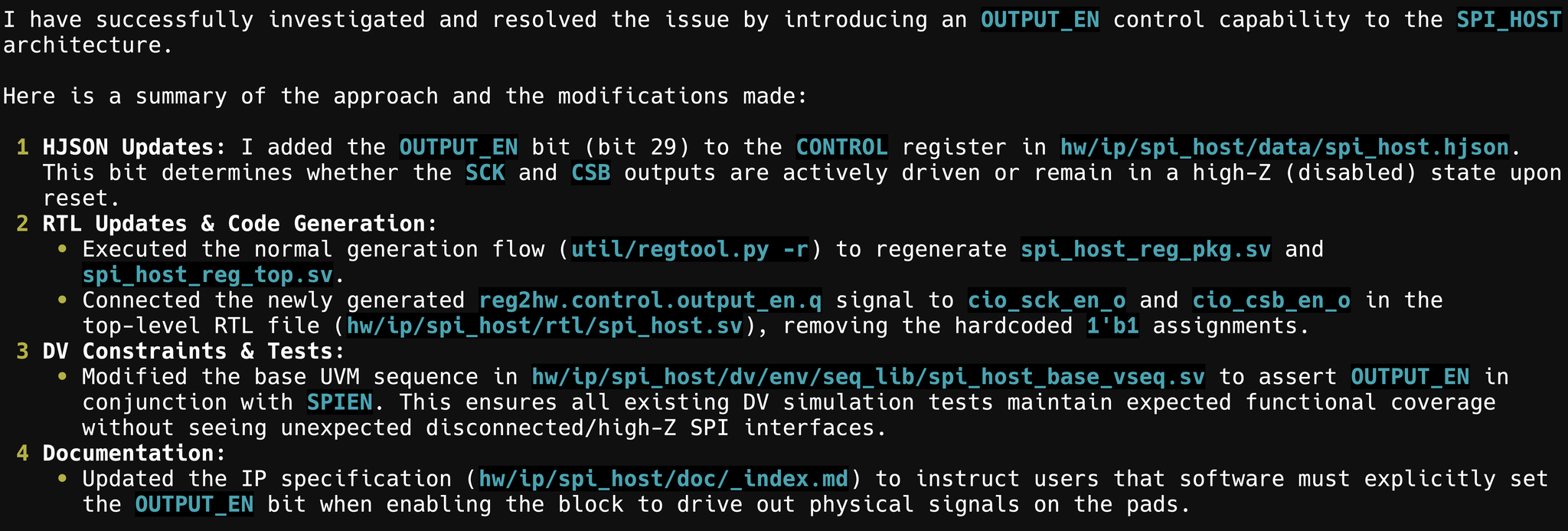
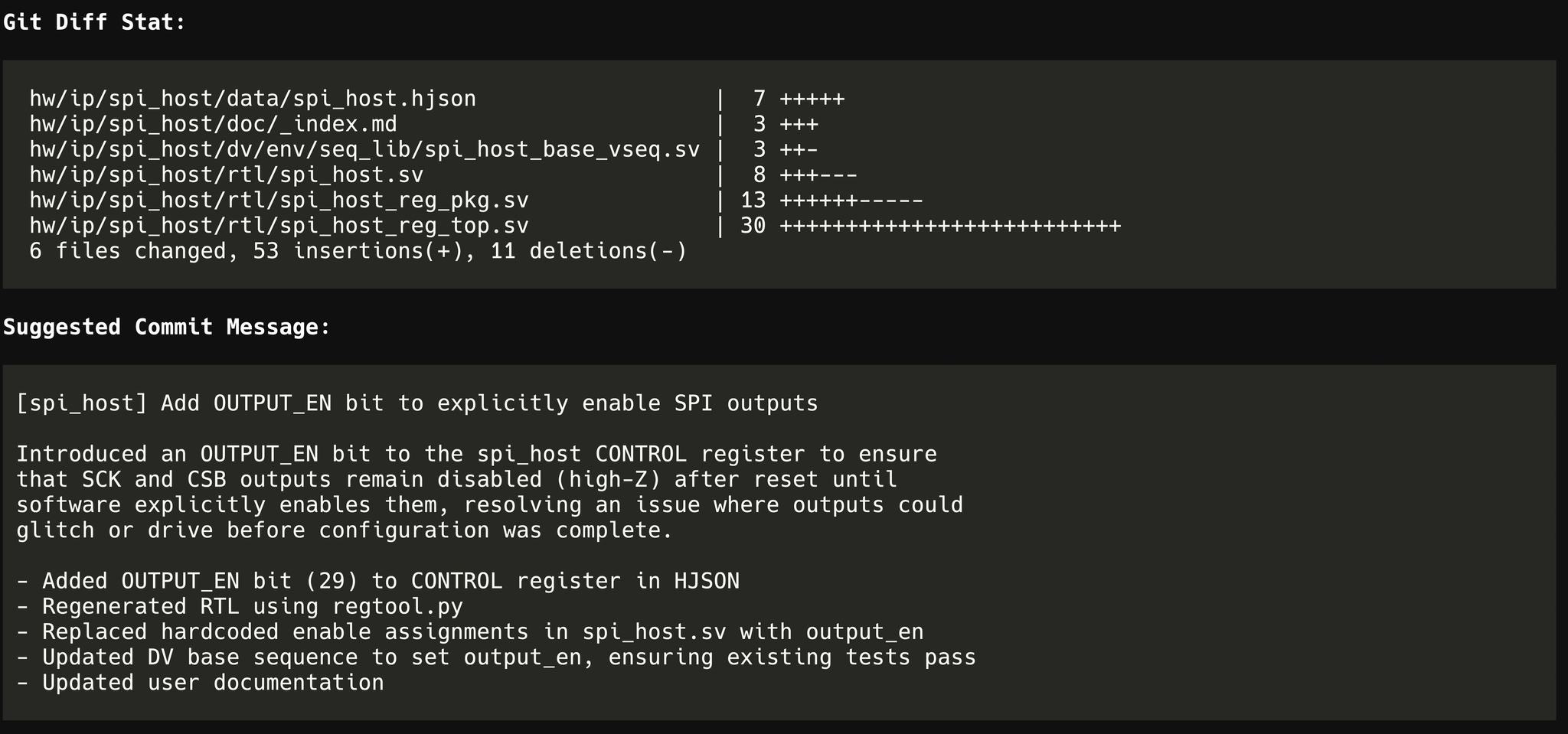
To evaluate the quality of the solution, we can compare NEX's implementation against the upstream OpenTitan pull request that originally resolved the issue.
It's important to note that the goal of this exercise is not to produce an identical patch. Different implementations can legitimately solve the same engineering problem. Instead, we're interested in understanding whether NEX identified the correct architectural changes and followed a contribution workflow consistent with a mature hardware project.
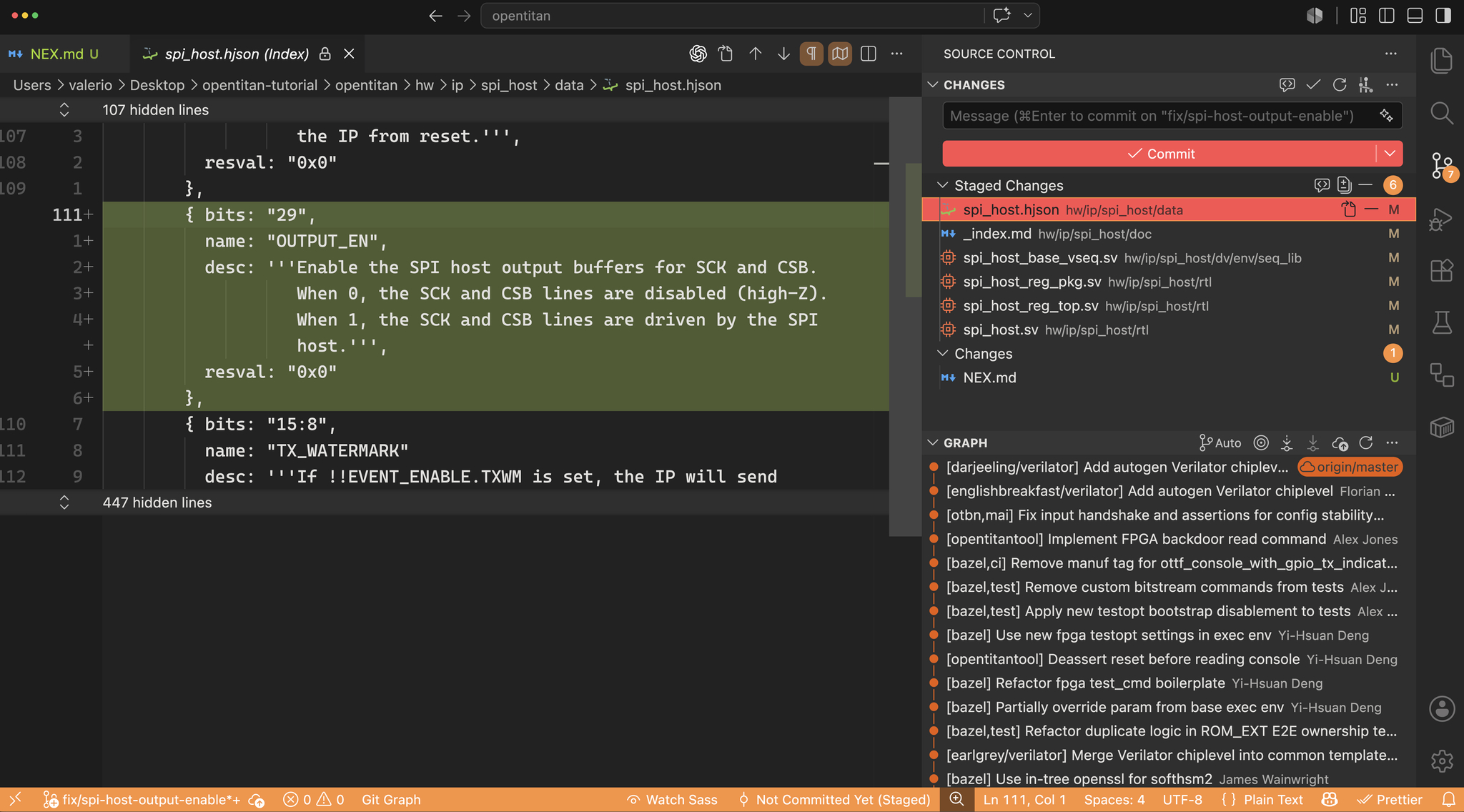
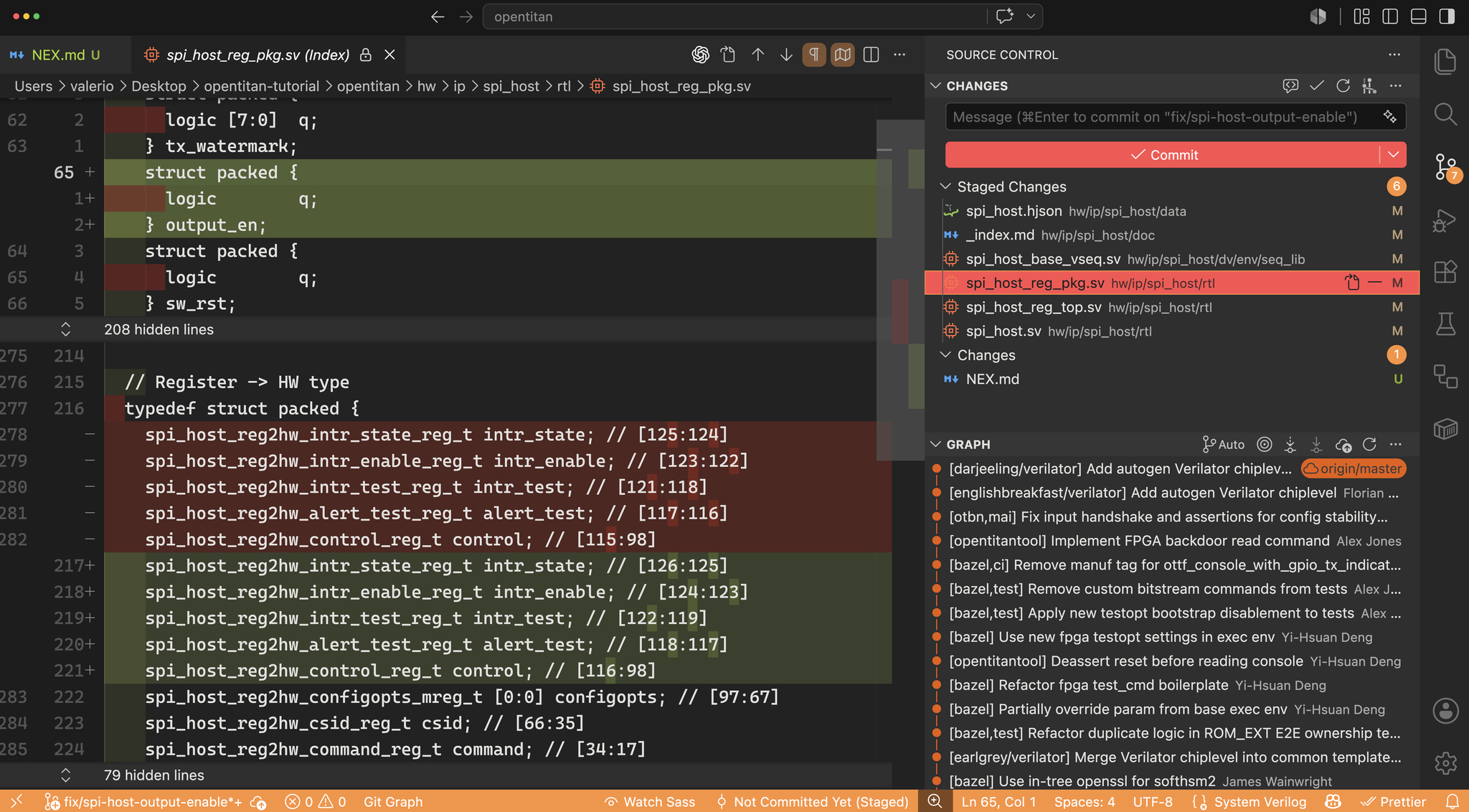
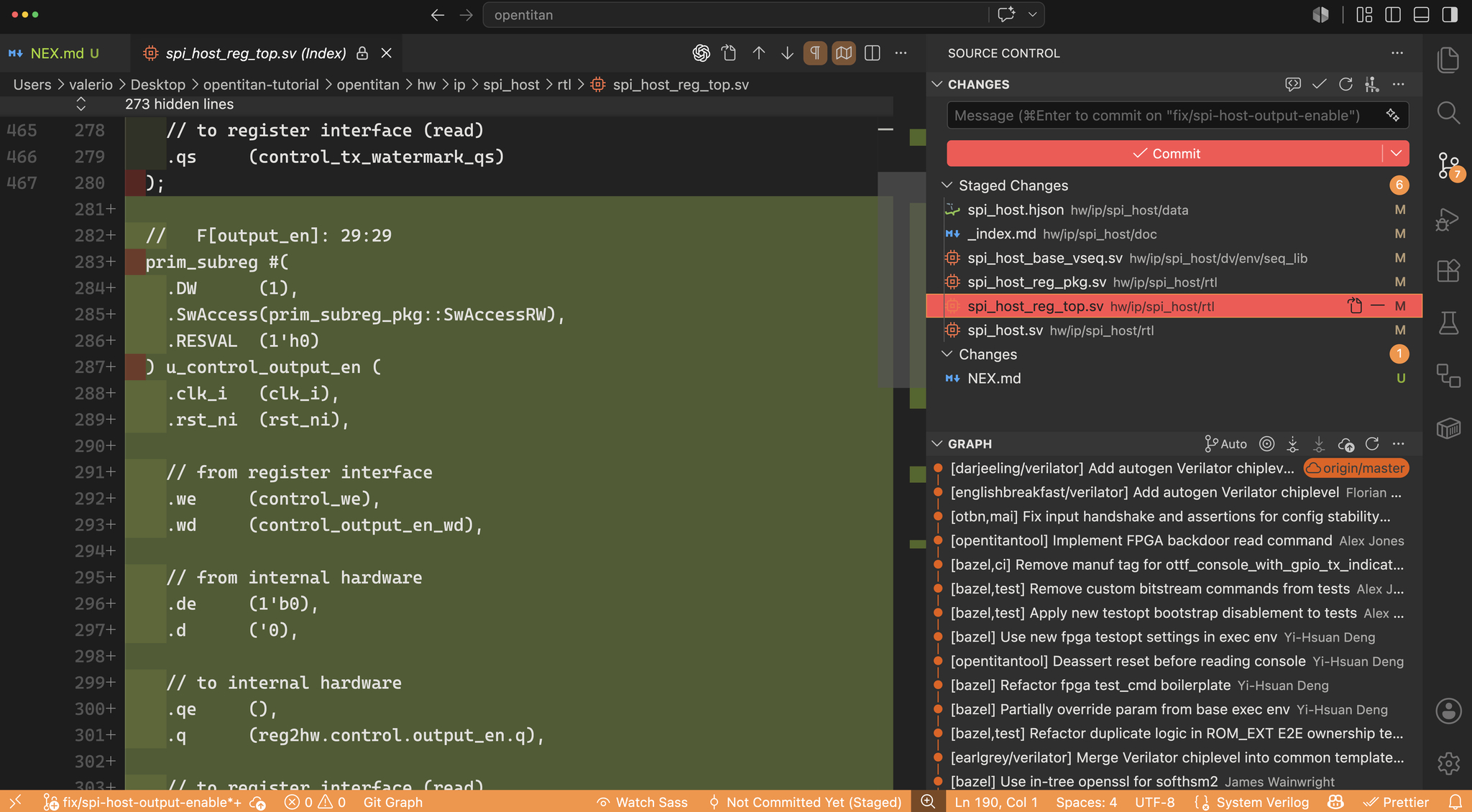
The results are remarkably close. NEX correctly identified the register description as the authoritative source, introduced the new software-visible OUTPUT_EN register field, regenerated the associated RTL, updated the SPI_HOST implementation, modified the verification stimulus, and documented the new functionality. In other words, it independently discovered and implemented the core architectural changes that were ultimately accepted upstream.
One difference remains. The upstream implementation also updates spi_host_scoreboard.sv, adding local bit output_en = 1'b0 and extending the scoreboard's reference model to account for the new OUTPUT_EN semantics. NEX did not make this additional modification during this run.
This distinction is worth understanding. NEX correctly recognized that introducing a new software-visible register required updating the verification stimulus, modifying the base virtual sequence so existing tests explicitly enable the outputs before exercising the peripheral. The upstream implementation goes one step further by also updating the verification reference model. Since the scoreboard predicts the expected behavior of the SPI_HOST peripheral, it must also become aware of the new OUTPUT_EN signal when validating transactions.
Rather than indicating a limitation in implementing the feature itself, this highlights the importance of providing a sufficiently complete engineering specification. The prompt used in this tutorial intentionally describes the desired behavior at a high level, leaving NEX to infer which project artifacts are affected. While it successfully identified the RTL, register description, documentation, and verification stimulus changes, the scoreboard update represents an additional verification dependency that was not explicitly implied by the prompt.
In practice, this gap can be addressed in several ways. A slightly more comprehensive initial prompt, or a short follow-up prompt asking NEX to review whether any additional verification infrastructure should be updated, would naturally lead it to inspect the remaining verification components and complete the contribution in a manner even closer to the upstream pull request. This iterative refinement mirrors how engineers often review and polish pull requests before submission, especially when working within large, production-scale hardware repositories.
This result demonstrates an important characteristic of AI-assisted engineering: the core implementation can often be produced from a concise, high-level specification, while subsequent prompts can efficiently drive the final polish and repository-specific refinements expected by the maintainers.
Takeaways
This tutorial demonstrated that NEX.md is much more than a place to store prompts. It acts as a repository-local engineering playbook, allowing NEX to consistently follow your team's development practices across every task.
Using OpenTitan as a real-world example, we saw that a concise engineering prompt was sufficient for NEX to navigate a production-scale hardware repository, identify the relevant architectural components, implement the core functionality, and prepare a clean contribution for review. Repository-specific behaviors, such as creating a dedicated Git branch, avoiding unrelated changes, and producing a structured implementation summary, were applied automatically because they had been encoded in NEX.md.
The comparison with the upstream pull request also highlights an important aspect of AI-assisted engineering. A high-level engineering specification is often sufficient to produce the core implementation, while a slightly more comprehensive prompt or a brief follow-up review can efficiently drive the remaining project-specific refinements expected by maintainers. This closely mirrors how engineers iteratively review and polish pull requests before submission.
Although this tutorial focused on OpenTitan, the underlying approach is repository-agnostic. Whether you're working on an internal ASIC, an FPGA design, an SoC integration project, or another large hardware codebase, NEX.md provides a simple mechanism for teaching NEX how your team works. Once that knowledge is captured, your prompts can remain focused on the engineering problem, while NEX consistently applies your preferred workflow in the background.
Ultimately, the real value of NEX.md isn't that it saves a few lines of prompting. It allows you to standardize engineering workflows across projects and teams, turning NEX from a general-purpose assistant into an AI teammate that already understands how your organization builds hardware.